Amplify Your Podcast Potential: 11 Essential Audio Tips for Hosts and Guests

Some links may be affiliate links. As an Amazon Associate, I earn from qualifying purchases.
As a media trainer, communications coach and host of the Sound Bites® podcast, I get lots of questions about podcasting so I’m sharing some of my favorite resources and information about tools and technology.
I find that podcasting is a lot like food and nutrition: there are some basic principles and strategies that are generally recommended and work well for almost everyone, regardless of individual needs and goals. However, also like food and nutrition, there are some great tools and techniques that work for some and not for others. Your personal preferences and individual needs will determine the best options and solutions for you and your show. At a minimum, your starting point will depend on whether you use a Mac or PC, if your show is solo/co-host or interview-based, and what resources you have more of (time, money, expertise, etc.).
Hosting a podcast isn’t for everyone – but I encourage dietitians to get their voices out into the media and social media in whatever ways they prefer. And don’t forget that you can be a GUEST on other podcasts so take these tips and tools and get your voice out there!
5 Tips to maximize sound quality during podcast interviews: (for you AND your guest)
- The best audio quality can be achieved with a fast and reliable internet connection. Go to https://www.speedtest.net to check your internet speed. For audio recordings you’ll want at least 10 MB per second upload and download. For video you’ll want at least 25 MB to 50 MB.
- Prior to the call, update your recording and call software to limit/avoid any potential glitches. Simply reboot your computer to make sure all updates are current. Ask your guest to do the same. In addition, you and your guest should close out of all other applications.
- During the call, avoid fiddling with stuff on your desk or playing with the mic cord. If using Apple earbuds or similar, then make sure the mic isn’t rubbing on your face/neck/ hair. Put your phone and computer notifications on silent. If your dog or cat is likely to bark or meow, consider putting them in another room.
- If using a headset, place the mic 1-1.5 inches from your mouth and avoid moving it for the duration of the call. Also make sure your mic and your guest’s mic are “selected” in the recording software and/or through the computer settings to avoid the default setting of the computer’s built-in mic.
- Try to find a quiet space to minimize background noise and ensure minimal distractions. A room with carpet is better than tiles as this helps to ensure sound doesn’t ‘bounce around.’
Bonus Tip for Working with Guests:
Help your guest be their very best by letting them know what to expect and how to prepare for the interview. This includes how you’re recording (phone, computer, audio, video, etc.) and what the topic/focus will be. I collaborate with my guests from the very beginning, so they know they are an important part of the process and I truly believe this results in a better final product.
5 Tips for Tools & Technology
I’ve used many different tools, technology and software programs since I launched my podcast in 2015. Thankfully, the tools and technology continue to improve and evolve. Here’s a summary of what I’ve tried and learned.
-
Microphones:

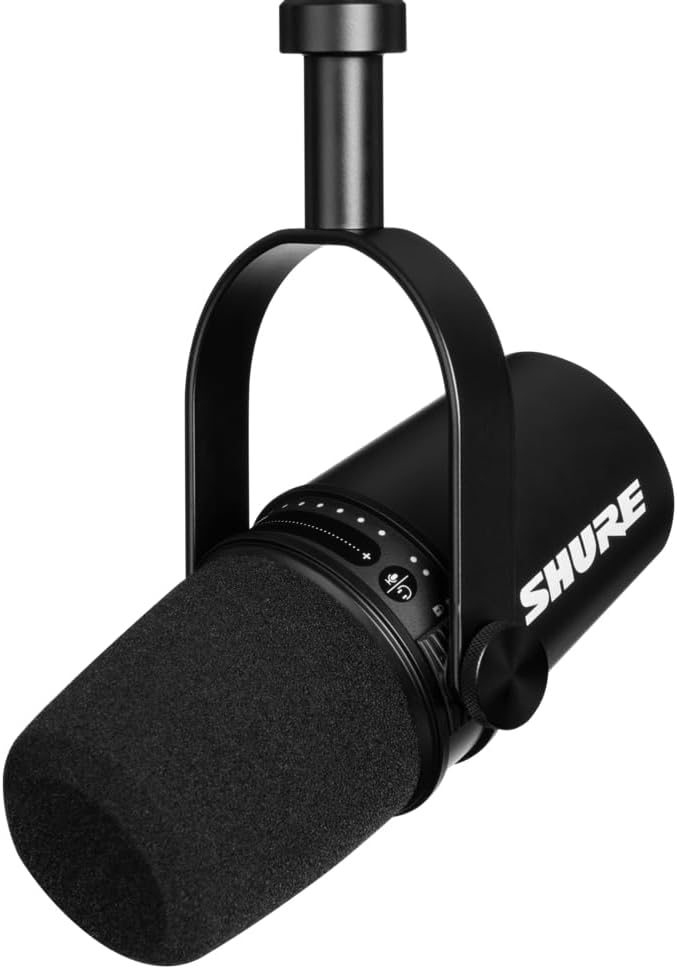
When I first started I had a very inexpensive CAD mic and then graduated to an ATR2100. I’ve also used the Samson Q2U and now use the Shure MV7.
At one point I was using a Yeti mic but I do NOT recommend a Yeti. Whatever you end up choosing, make sure it is a dynamic mic and not a condenser mic. Watch this video to learn why.

Purchasing and using an external microphone won’t make a difference if you don’t remember to select the mic in your system settings or in your recording platform as the default may be set to your computer’s built-in mic. It’s an easy mistake to make and unfortunately, I’ve made it more than once. However, the computer’s built-in mic may actually sound okay. And, if you’re interviewing a guest, that may be what they are using on their end anyway. If you or your guest want to use a headset, those typically don’t sound great so you may be better off with the built-in mic. However, I had a guest who used this inexpensive Andrea headset and it sounded really good.
-
Headphones (to use for your speaker, NOT as your mic):
If you’re interviewing guests, it’s really important that both of you wear headphones to eliminate background noise and echo. I have always used Apple earbuds that plug into my mic. These can also plug into your computer if you or your guest are using the built-in mic – just be sure you have the right jack (3.5mm jack works for both my mic and my computer). I find these to be more comfortable than the headphones that go over the ears. I know that Apple Airpods are popular these days but unfortunately, they can sometimes be glitchy. For example, you may be using them as your speaker and have a different mic selected but then during the interview it might switch over to using the Airpods as the mic.
Here are some headphones that my podcast editor and producer recommends: OneOdio, Audio-Technica ATH-M20X, Sony MDR-7506. Coincidentally, I use the OneOdio ones for my drum set and love them.
-
Recording Software:
If you are doing a solo show you don’t have to worry much about this choice. But if you’re interviewing guests remotely like I do, there’s a lot more to consider. Over the years I used many different platforms including Skype (with Amolto or Callnote) and Zencastr. The sound quality of those platforms isn’t the greatest but they are better than Zoom. I had a lot of issues with Zencastr crashing and other glitches, but Skype was pretty reliable and also fairly straightforward for my guests to use. I now use SquadCast because it’s much better audio quality. There’s a little bit more involved regarding guest set up but it’s worth it.
-
Editing Software:
I have never edited my own show and never plan to do so. This is one area that I always plan to outsource. If you are interested in editing your own show, look into the options for Audacity, Garageband and Adobe Audition. There are many editing tutorials on YouTube.
I’ve worked with many different consultants and companies over the past eight years and let’s just say I kissed a lot of frogs before finding my current editor and producer, Jon “JAG in Detroit” Gay. Working with him has been a gamechanger for me. If you want to know more about this, you can check out our video here. Or check out Jon’s website for more info.
-
Hosting Service:
I have been with Libsyn from the very start and have been very happy with their hosting platform, services, cost, etc. Other options are PodBean, BuzzSprout, Blubrry, Simplecast, and many more.
Check out my Amazon Shop
to quickly browse the products I’ve recommended.
Podcast resources:
- How to Start A Podcast – equipment tips & recording software
- The Ultimate Podcast Resource List (equipment, hosting, software, media)
- Audacity to Podcast (free podcast about podcasting)
- How to Expand Your Business by Creating a Compelling Podcast
- 5 Ways that Podcasting is a Powerful Marketing Weapon
- How to Start a Podcast
- Podcasting Manual by Blubrry
- She Podcasts (resources, courses, community)
- Listen Notes (podcast search engine)
- Podcast transcription service
- List of Podcasts by RDNs & Resources for Starting a Podcast
Facebook groups:
To download a PDF of this info click here
Related
WELCOME TO MY BLOG
Thank you for stopping by!
I’m the Guilt-Free RD – “Because food shouldn’t make you feel bad!™”. So, on my Food for Thought blog I’m sharing the secret ingredients to enjoy your food with health in mind.

Subscribe!
Sign up for my monthly newsletter and episode eblasts so you never miss an update!
LISTEN TO MY PODCAST

Listen to the trailer
Melissa’s Demo Reel